Humidifier Leaves White Dust: Water Minerals, Filters and Options
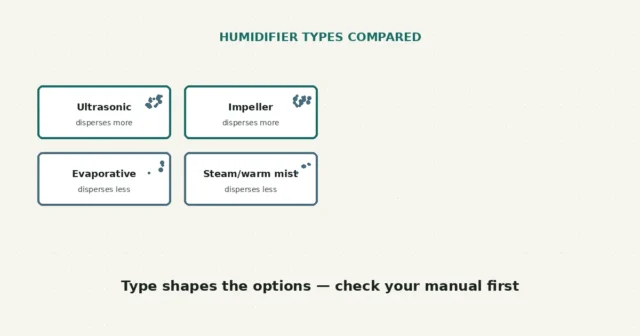
White dust is often associated with minerals dispersed by ultrasonic or impeller humidifiers, per EPA guidance, though appearance alone cannot…
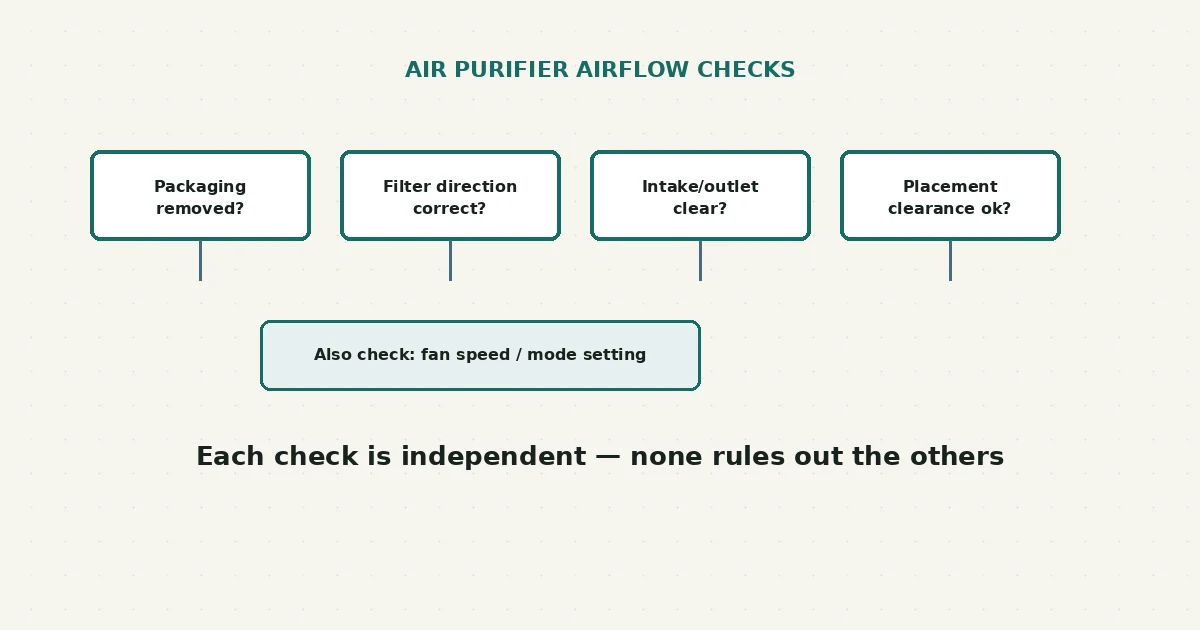
Weak airflow from an air purifier is commonly related to something in the path air has to travel — protective packaging left on a filter, a filter installed backward, a loaded filter, or a blocked intake or outlet — rather than a failed motor. EPA guidance notes that higher fan speeds move more air through the filter, so checking your speed setting is also worth doing before assuming a fault.
Power off and unplug the unit. Check that all plastic packaging has been removed from every filter, confirm each filter is seated in the correct direction per your manual, and check that the intake and outlet vents aren’t blocked by furniture, curtains, or placement against a wall. Then check your fan speed and mode setting. If airflow is still weak after these checks, that’s a reasonable point to contact the manufacturer.
Feeling less air movement than you expect is a real observation, but it isn’t a measurement of filtration performance, Clean Air Delivery Rate (CADR), or contaminant removal. According to EPA guidance, higher fan speeds and longer run times generally move more air through the filter, and an air cleaner filters less air at a lower speed setting — so a purifier running on a low or quiet mode may simply be moving less air by design, not malfunctioning.
This guide separates several things that commonly affect airflow: filter loading, protective packaging left on a new filter, filter direction and seating, a blocked intake or outlet, placement and clearance, the selected mode, and sensor-controlled speed changes on models that adjust automatically. None of these confirms the others, and more than one can be present at once.
| What you observe | Possible explanation | Reasonable next step |
|---|---|---|
| Unit is new or recently had a filter changed, airflow feels restricted | Protective plastic wrap may still be on one or more filter layers | Power off, unplug, and check every filter layer for wrap, per your manual |
| Filter was reinstalled after cleaning or replacement | May be seated backward or not fully seated | Check your manual’s diagram for correct orientation and reseat if needed |
| Unit sits close to a wall, curtain, or inside furniture | Intake or outlet may be partially blocked | Reposition per your manual’s clearance guidance |
| Airflow is noticeably weaker on a specific mode or at night | Some models automatically lower speed on quiet, sleep, or auto modes based on sensor readings | Compare airflow across modes before assuming a fault |
| Filter hasn’t been replaced in a long time and airflow has gradually declined | A loaded filter restricts airflow, per EPA guidance on how air cleaners function | Check your manual’s replacement guidance for your specific filter type |
These are observations to help you narrow down what to check next, not a confirmed diagnosis — a purifier can have more than one of these at once, especially after a recent filter change or a room rearrangement.
This guide covers filter packaging, direction, seating, intake and outlet obstructions, placement and clearance, and mode or speed settings. It does not cover opening the fan, motor, or electrical housing, bypassing filter or interlock sensors, probing wiring, defeating alarms, or modifying an ionizer or ozone-generating feature. This guide does not treat felt airflow, weak or strong, as proof of clean-air delivery, CADR, filtration efficiency, contaminant removal, or any health outcome — EPA, AHAM, or CARB guidance is cited here only where it directly supports a specific statement, and none of it should be read as an endorsement of any particular product.
Not necessarily, and this guide doesn’t make that claim either way — airflow you can feel by hand is a rough observation, not a measurement of filtration performance or CADR.
Only if your exact filter’s instructions say it’s washable — many HEPA-type filters are designed to be replaced, not cleaned, and washing one not designed for it can damage the filter media.
Often, yes — many purifiers intentionally reduce fan speed on quiet or sleep settings, which reduces airflow by design rather than indicating a problem. Compare across modes before assuming a fault.
Only if your exact model’s manual explicitly permits it. Adding unsupported substances to a filter or unit isn’t something this guide recommends, since it can affect the filter material or the unit’s internal parts in ways the manufacturer hasn’t tested for.
On models with an air-quality sensor, the unit may automatically raise or lower fan speed based on what it detects in the room — cooking, dust, or other activity can trigger a temporary speed increase. This is normal behavior on those models rather than a sign of a fault, but check your manual to confirm whether your specific unit has this feature.
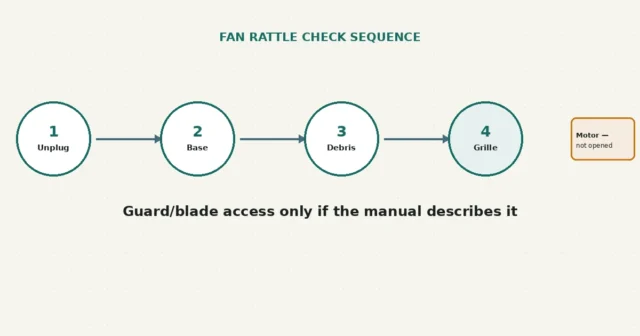
If you’re managing air quality with more than one appliance, the humidifier white-dust guide covers a related manual-first approach for a different kind of unit. And if a portable fan nearby has developed a rattle rather than weak airflow, this portable fan guide walks through a comparable least-invasive sequence.
New to RFSE? See how to approach any RFSE guide safely, or browse the full Air & Comfort hub for more guides like this one.
This guide is based on official EPA guidance and manufacturer documentation current as of publication. Filter types, replacement intervals, and clearance requirements vary by model — always confirm details against your exact unit’s manual.
White dust is often associated with minerals dispersed by ultrasonic or impeller humidifiers, per EPA guidance, though appearance alone cannot…
A rattle may relate to accessible dust, grille fit or base contact, but sound alone cannot identify the motor condition.…
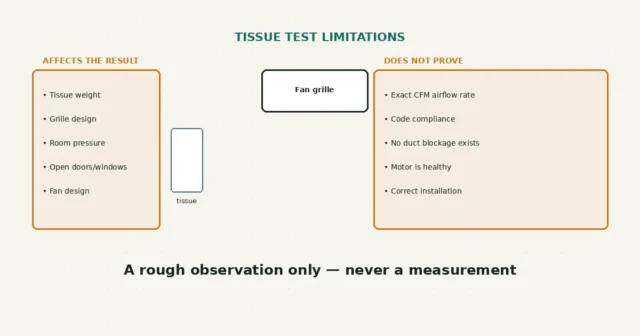
The accessible grille is one low-risk first check after the manual-required power isolation. A tissue test cannot measure airflow or…